
How AI Is Redefining Modern Website Design in 2026
Remember when websites were static brochures, essentially digital flyers that sat unchanged for months or years? Those days are gone. Today’s websites are intelligent, adaptive platforms that learn from visitors, adjust to individual preferences, and continuously optimize themselves for better results. This transformation isn’t magic, it’s artificial intelligence reshaping how we design, build, and maintain websites.
AI in website design doesn’t mean robots replacing human creativity. Instead, it refers to smart tools and systems that analyze user behavior, automate repetitive tasks, generate design variations, and provide data-driven recommendations. These technologies help designers and business owners create more effective, user-friendly websites faster than ever before.
In this guide, you’ll discover exactly how AI is changing modern website design in 2026. You’ll learn which AI tools actually help small businesses, how to balance automation with human creativity, and practical steps to make your own website more intelligent and effective. Whether you’re planning a redesign or simply want to stay competitive, understanding this shift is essential for success.
What “Modern Website Design” Means in 2026
Modern website design has evolved far beyond making things look pretty. Today, successful websites must excel across multiple critical dimensions that directly impact business results.
Mobile-first design is no longer optional. With over 60% of web traffic coming from mobile devices, your site must work flawlessly on smartphones first, then scale up to tablets and desktops. AI tools now analyze mobile user behavior patterns to recommend optimal touch target sizes, scrolling behaviors, and content prioritization that makes mobile experiences genuinely better.
Speed matters more than ever. Research shows that a one-second delay in page load time can reduce conversions by 7%. AI-powered performance monitoring identifies bottlenecks in real time, automatically optimizes images for different devices, and suggests code improvements that shave precious milliseconds off load times. These micro-optimizations compound into significantly better user experiences.
Accessibility ensures everyone can use your site. Beyond being the right thing to do, accessibility is increasingly required by law and rewarded by search engines. AI accessibility checkers scan your entire site for contrast issues, missing alt text, keyboard navigation problems, and screen reader compatibility, flagging problems human testers might miss.
User experience drives conversion. Every element on your page should guide visitors toward taking action, whether that’s making a purchase, booking a consultation, or signing up for your newsletter. AI heatmap and session recording tools reveal exactly where users get confused or frustrated, allowing designers to remove friction points systematically.
Trust signals build credibility. Modern visitors are sophisticated and skeptical. They look for security badges, genuine reviews, transparent policies, and clear contact information before doing business with you. AI content analysis helps ensure these trust elements are prominently displayed and consistently maintained across your site.
AI supports each of these principles by turning subjective design decisions into data-driven strategies. Rather than guessing what might work, you can test, measure, and optimize based on actual user behavior.
Types of AI Used in Website Design
Understanding the specific AI technologies transforming web design helps you make informed decisions about which tools to adopt for your business.
AI Design and Layout Assistants
These tools analyze thousands of high-performing websites to suggest layouts, color schemes, and component arrangements that work well for specific industries and goals. They can generate multiple design variations in minutes, allowing you to explore options that would take human designers hours or days to mock up.
The benefits are clear: faster ideation, data-backed design decisions, and reduced costs for initial concepts. However, limitations exist. AI-generated designs can feel generic if not customized, and they may miss subtle brand nuances that make your business unique. Think of these tools as talented junior designers who need senior oversight and creative direction.
AI Copywriting Assistants
AI writing tools can draft website copy, product descriptions, and even blog content based on prompts and guidelines you provide. They’re particularly useful for generating multiple headline variations, expanding outline points into full paragraphs, and overcoming writer’s block.
Critical point: AI-generated copy always requires human editing. These tools sometimes produce awkward phrasing, make factual errors, or miss your brand voice entirely. Use them to accelerate the writing process, but never publish AI content without thorough review and refinement. Search engines are increasingly sophisticated at detecting purely automated content, which can harm your rankings.
AI Analytics and Behavior Tracking
Modern analytics platforms use machine learning to identify patterns in user behavior that humans would never spot manually. They predict which visitors are likely to convert, identify drop-off points in your sales funnel, and segment audiences based on sophisticated behavioral signals rather than simple demographics.
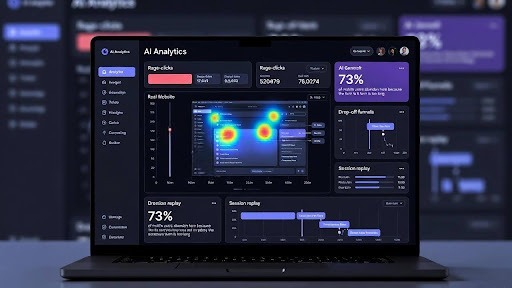
AI-powered heatmaps show you where users actually look and click, not just where you hope they will. Session replay tools let you watch anonymized recordings of real user sessions, revealing friction points and opportunities for improvement. These insights transform vague hunches into concrete action plans.
AI Chatbots and Conversational Interfaces
Intelligent chatbots have evolved from frustrating menu systems into genuinely helpful assistants. Modern AI chatbots understand natural language, learn from conversations, and can handle increasingly complex customer service tasks without human intervention.
They provide 24/7 availability, instant responses, and consistent service quality. For small businesses, this means you can offer enterprise-level support without enterprise-level staffing costs. However, transparency matters, visitors should always know they’re talking to a bot and have easy access to human support when needed.
Recommendation Engines for Content and Products
If you’ve ever been impressed by how Netflix seems to know what you want to watch next, you’ve experienced recommendation engine AI. These systems analyze user behavior, preferences, and patterns to suggest relevant content or products that increase engagement and sales.
For e-commerce sites, product recommendations can increase average order value by 10-30%. For content sites, personalized article suggestions keep visitors engaged longer, reducing bounce rates and improving SEO signals. The risk is creating filter bubbles or seeming intrusive, so balance personalization with serendipitous discovery and clear privacy controls.
AI vs Traditional Web Design Workflow
Understanding how AI changes the actual process of designing and building websites helps you appreciate both the efficiency gains and the new skills required.
Traditional Web Design Workflow
The conventional website redesign follows a predictable path. First, you conduct stakeholder interviews and user research, which takes weeks to schedule and complete. Then designers create mood boards and mockups, going through several revision cycles as everyone shares feedback.
Developers build the site based on approved designs, often discovering technical constraints that require design adjustments. Content writers draft copy, which rarely fits perfectly into designed layouts, triggering more revisions. Finally, QA testers check for bugs before launch, often finding issues that require developer time to fix.
This process typically takes three to six months for a moderately complex website. Changes after launch require going back through multiple steps, making iteration slow and expensive. Small businesses often delay necessary updates because the traditional workflow demands significant time and budget.
AI-Enhanced Hybrid Workflow
The modern approach integrates AI tools at every stage, dramatically accelerating the process while often improving quality. AI analytics platforms analyze your existing site and competitor sites in hours, identifying specific problems and opportunities that would take humans weeks to uncover manually.
Designers use AI tools to generate dozens of layout options instantly, then refine the most promising directions with human creativity and brand expertise. AI copywriting assistants draft initial content that writers edit and enhance, cutting content development time in half while maintaining quality standards.
Developers leverage AI code assistants that suggest solutions, catch bugs before they become problems, and automate repetitive coding tasks. AI testing tools scan for accessibility issues, performance bottlenecks, and browser compatibility problems automatically, freeing QA specialists to focus on complex user experience testing that requires human judgment.
The result? Website projects that once took six months now complete in six to eight weeks, with better data backing every decision.
Real-World Example: Local Fitness Studio
Consider a mid-sized fitness studio planning to revamp their website to attract more members. Using traditional methods, they’d spend weeks interviewing current members, designers would create mockups based on generic fitness industry templates, and they’d launch hoping the new site performs better.
With AI-enhanced design, they started by using behavior analytics on their existing site. The AI revealed that mobile visitors abandoned the class schedule page at a 73% rate a problem nobody had noticed. Session recordings showed users struggled to filter classes by time and instructor on small screens.
AI layout tools generated fifteen different schedule interface options optimized for mobile interaction. The owner and designer selected the most promising, refined the design with brand colors and photography, and tested variations with AI-powered A/B testing tools.
The new schedule interface reduced mobile abandonment to 34% within the first month. Class bookings through the website increased 47%. The entire project, from analysis to launch, took seven weeks instead of the six months their previous redesign required. More importantly, decisions were based on actual user behavior data rather than assumptions.
Lorem ipsum dolor sit amet, consectetur adipiscing elit. Ut elit tellus, luctus nec ullamcorper mattis, pulvinar dapibus leo.

UX, Core Web Vitals, and Semantic SEO in the Age of AI
Technical performance and search engine optimization have become inseparable from good design. Understanding how AI helps you excel in both areas gives you a significant competitive advantage.
Understanding Core Web Vitals
Core Web Vitals are Google’s user experience metrics that measure real-world performance. They include Largest Contentful Paint (how quickly your main content loads), First Input Delay (how responsive your page is to user interactions), and Cumulative Layout Shift (whether elements jump around as the page loads).
These metrics directly impact your search rankings. Slow, janky websites frustrate users and get penalized by Google’s algorithms. The challenge for small businesses is that measuring and fixing Core Web Vitals issues requires technical expertise that most don’t have in-house.
How AI Tools Fix Performance Problems
AI-powered performance monitoring tools continuously scan your website from multiple locations and devices, identifying exactly which elements slow down your pages. Rather than generic advice like “optimize images,” these tools tell you “the hero image on your homepage is 2.4MB and causes a 3.2-second delay on 4G connections; here’s a properly optimized version.”
Some AI tools automatically optimize images, defer non-critical JavaScript, and implement other technical improvements without requiring developer expertise. They detect when updates to your site accidentally break performance and alert you immediately. This continuous optimization was previously available only to enterprise companies with dedicated performance engineering teams.
Semantic SEO and Content Architecture
Semantic SEO has replaced the old keyword-stuffing approach. Search engines now understand topics, context, and relationships between concepts. They reward comprehensive content organized into logical topic clusters with clear internal linking structures.
AI research tools can analyze the top-ranking content for any topic, identify semantic relationships and subtopics, and suggest content structures that thoroughly cover subjects. They map out internal linking opportunities that strengthen topical authority and help search engines understand your content hierarchy.
However, AI handles the research and suggests humans must design the actual information architecture. You need to understand your audience’s journey, decide which topics matter most for your business goals, and craft content that genuinely helps people rather than just targeting search engines. Partnering with a modern web design agency can help you balance AI-powered insights with strategic human expertise.
E-E-A-T & Trust: Designing Sites Google and Humans Believe
Your website’s credibility determines whether visitors become customers and whether Google ranks your content highly. Understanding and implementing E-E-A-T principles is essential for modern website success.
What E-E-A-T Means
E-E-A-T stands for Experience, Expertise, Authoritativeness, and Trustworthiness the criteria Google uses to evaluate content quality. Experience means demonstrating first-hand knowledge of your subject. Expertise shows you have relevant credentials or deep knowledge. Authoritativeness indicates others in your field recognize your competence. Trustworthiness means being accurate, transparent, and reliable.
These qualities matter because Google wants to surface content that actually helps people, particularly for topics that impact health, finances, safety, or major life decisions. A website selling financial services needs much stronger E-E-A-T signals than a hobby blog about gardening.
Design Tactics to Demonstrate E-E-A-T
Your website design can substantially strengthen or weaken your E-E-A-T signals. Start with a comprehensive About page that tells your authentic story, explains your qualifications, and shows your face. Generic “we’re a team of passionate professionals” copy doesn’t build trust specific details about your experience and achievements.
Display clear author bios on blog posts and articles. Include photos, credentials, and links to professional profiles. When visitors can see that “Sarah Johnson, CPA with 15 years of tax planning experience” wrote your tax advice article, they trust the information more than unmarked content.
Feature genuine testimonials and case studies with real names, photos, and specific results. “This service is great! – John D.” provides minimal trust value. “Chainbot Solutions rebuilt our e-commerce site and increased our conversion rate from 1.8% to 3.4% in three months, generating an additional $47,000 in monthly revenue. – Jennifer Martinez, Owner, Artisan Coffee Roasters” tells a credible story.
Make your policies transparent and easy to find. Clear privacy policies, refund policies, and terms of service show you operate professionally and respect your customers. Display security badges and SSL certificates prominently during checkout or form submission processes.
Provide multiple ways to contact you. Real businesses have phone numbers, physical addresses, email addresses, and often live chat. If you’re hiding behind a contact form with no other information, visitors wonder what you’re concealing.
How AI Helps Organize Trust Evidence
AI content analysis tools can scan your site to identify missing E-E-A-T elements. They flag pages without author attribution, testimonials that need more detail, or policy pages with vague language. Some tools even compare your site against top competitors to identify trust gaps.
AI can help organize and present your credentials, awards, certifications, and media mentions in compelling ways. However, AI must never fabricate or exaggerate qualifications. Always verify that any content about your expertise is completely accurate and backed by real evidence.
Real-World Use Cases by Industry
Seeing how different types of businesses apply AI-driven design helps you envision possibilities for your own website.
Local Service Business: Plumbing Company
A regional plumbing company struggled with late-night emergency calls going to voicemail because their phone system couldn’t handle volume. They implemented an AI chatbot trained specifically on plumbing emergencies that could assess situations, provide immediate safety guidance, schedule next-day appointments, or escalate true emergencies to on-call plumbers.
The AI chat interface used natural language processing to understand “my water heater is making weird noises and there’s water on the floor” and respond with relevant questions and advice. This improved customer satisfaction scores by 34% and reduced the administrative burden on human staff who previously triaged calls manually.
AI analytics revealed that most visitors needed service area information before requesting quotes. The design team restructured the site to emphasize geographic coverage prominently on the homepage, reducing bounce rates and increasing contact form submissions by 28%.
E-Commerce Store: Specialty Pet Supplies
An online pet supply retailer implemented AI product recommendations that analyzed purchase history, browsing behavior, and similar customer patterns. When a customer bought premium dog food, the system suggested complementary items like treat-dispensing toys and food storage containers that statistically sold well together.
This personalization increased average order value by 23% without feeling pushy or intrusive. The AI learned that customers who viewed organic products preferred subtle, education-focused recommendations, while bargain-hunters responded to bundle deals and limited-time offers.
The site also used AI-powered visual search, allowing customers to upload photos of products they wanted to match. This particularly helped customers find similar items to discontinued products or find alternatives to competitor products.
SaaS Startup: Project Management Tool
A project management software startup used AI to completely personalize the new user onboarding experience. Instead of forcing all users through identical tutorials, their AI analyzed each user’s role, industry, and behavior to present relevant features and examples.
Marketing managers saw campaign planning examples. Software developers saw sprint planning workflows. This tailored approach reduced the time to first value from 4.7 days to 1.2 days and improved trial-to-paid conversion by 41%.
AI-driven A/B testing automatically experimented with pricing page layouts, call-to-action language, and feature emphasis. Rather than running tests for weeks to reach statistical significance, their AI system reached conclusions in days by intelligently allocating traffic to winning variations.
Staffing Agency: Healthcare Recruiters
A healthcare staffing agency implemented AI enhanced candidate and job matching on their website. Job seekers could describe their preferences conversationally (“I’m a pediatric nurse in Chicago looking for part-time positions with flexible schedules”) and receive genuinely relevant opportunities rather than generic listings.
The AI learned which job characteristics (location, schedule, facility type, specialty) mattered most to different candidates, improving match quality over time. Placement rates increased 19% because candidates received opportunities that truly fit their needs rather than spray-and-pray job listings.
The website’s candidate portal used AI to identify gaps in profiles and prompt users with specific, helpful questions (“You mentioned five years of ICU experience which specific equipment and procedures are you most experienced with?”). This improved profile completion rates and gave recruiters better information to work with.
Risks, Limitations, and Ethics of AI in Web Design
Thoughtful business owners must understand both the benefits and potential pitfalls of AI-enhanced web design before implementation.
The Danger of Over-Automation
The biggest risk with AI tools is trusting them too completely. AI can optimize metrics while degrading actual user experience. For example, an AI tool might discover that popup modals increase email signups by 15%. It might then suggest increasingly aggressive popup strategies that technically boost conversions while annoying visitors so much they never return.
Metrics like conversion rate and click-through rate are important, but they’re proxies for the real goal: building lasting customer relationships. AI optimizes what you measure, not necessarily what truly matters. Always maintain human judgment about whether optimizations serve your business’s long-term health.
Generic Design and Lost Differentiation
AI design tools trained on thousands of websites naturally gravitate toward patterns that work broadly. This creates sameness lots of websites that are technically functional but completely forgettable. Your brand’s unique personality gets smoothed away in favor of statistically average layouts and language.
Combat this by using AI for speed and efficiency, then layering in distinctive brand elements that only humans can create. Your specific story, your unique voice, your particular visual aesthetic these differentiators require human creativity and judgment.
Hallucinated Content and Factual Errors
AI language models sometimes generate plausible-sounding content that’s completely false. They might invent statistics, attribute quotes to people who never said them, or confidently assert “facts” with no basis in reality. Publishing this misinformation damages your credibility and violates E-E-A-T principles.
Never publish AI-generated content without thorough fact-checking. Verify statistics against original sources. Confirm quotes are accurate and properly attributed. If you can’t verify something, don’t use it regardless of how good it sounds.
Algorithmic Bias and Exclusion
AI systems learn from historical data, which means they can perpetuate and amplify existing biases. An AI tool trained on historical hiring data might recommend job posting language that appeals to men over women. A recommendation engine might systematically exclude certain types of content or products based on biased training data.
Test your AI implementations across diverse user groups. Monitor whether AI recommendations serve all your customers fairly. Be willing to override AI suggestions that produce exclusionary or biased outcomes, even if they technically optimize short-term metrics.
Privacy and Data Protection
AI tools that personalize experiences need data about user behavior. Collecting, storing, and analyzing this data creates privacy obligations and risks. Visitors increasingly object to excessive tracking and personalization that feels invasive.
Be transparent about what data you collect and how you use it. Implement privacy controls that give users meaningful choices. Use only the data you actually need don’t collect information just because you can. Comply with regulations like GDPR and CCPA not just legally but in spirit.
Best Practices for Responsible AI Use
Establish clear review processes where humans verify AI outputs before they impact users. Maintain transparency when using AI chatbots or personalization, tell users. Prioritize data protection and privacy from the start rather than as an afterthought.
Set guardrails that prevent AI systems from making decisions beyond their competence. For example, an AI chatbot should never make medical or legal recommendations regardless of what users ask. Program clear boundaries and escalation paths to human experts.
Regularly audit your AI implementations for bias, errors, and unintended consequences. What starts as a helpful tool can gradually drift toward problematic behavior without active monitoring and correction.
Practical Roadmap: How to Make Your Website AI-Ready in 6–12 Months
Transforming your website doesn’t require a massive upfront investment or technical expertise. Follow this step-by-step approach to progressively adopt AI-enhanced design.
Step 1: Audit Your Current Situation (Month 1)
Begin by understanding where you stand today. Install basic analytics if you haven’t already Google Analytics is free and provides essential insights. Review your current Core Web Vitals using Google Search Console and PageSpeed Insights. Document your current conversion rates, bounce rates, and average session duration as baselines.
Identify your biggest pain points. Are visitors abandoning your mobile site? Is your contact form getting few submissions? Do you have high traffic but low conversions? Understanding specific problems helps you prioritize which AI tools will provide the most value.
Survey or interview recent customers about their website experience. What nearly stopped them from doing business with you? What worked well? Direct user feedback often reveals issues that analytics alone miss.
Step 2: Define Clear Goals and Metrics (Month 1)
Decide what success looks like with specific, measurable objectives. “Improve the website” is too vague. “Reduce mobile bounce rate from 68% to under 50%” and “increase contact form submissions by 25%” give you clear targets.
Identify which metrics matter most for your business model. E-commerce sites focus on conversion rate and average order value. Service businesses might prioritize consultation bookings and phone calls. B2B companies often measure content downloads and demo requests.
Establish a measurement cadence. Review your key metrics weekly or monthly, depending on your traffic volume. Consistent measurement reveals trends and helps you understand whether changes actually improve results.
Step 3: Fix the Fundamentals First (Months 2-3)
Before adding sophisticated AI features, ensure your website basics work properly. Fix major performance issues, compress images, minimize code, enable caching. Aim for Core Web Vitals scores in the “good” range on mobile devices.
Ensure your site works perfectly on smartphones. Test every form, button, and interactive element on multiple devices. Fix navigation problems, tiny tap targets, and difficult-to-read text.
Strengthen your E-E-A-T signals with comprehensive About pages, author bios, genuine testimonials, and clear contact information. These trust elements don’t require AI but dramatically impact visitor confidence.
Improve your content architecture by organizing related content into logical topic clusters and strengthening internal linking. This foundation makes AI-powered personalization and recommendations more effective when you add them later.
Step 4: Implement Foundational AI Features (Months 4-6)
Start with AI analytics that provides deeper insights into user behavior. Tools like Hotjar or Microsoft Clarity offer free plans with heatmaps and session recordings. Spend time actually watching how real users navigate your site you’ll discover problems you never imagined.
Add a quality AI chatbot if your business receives repetitive questions or would benefit from 24/7 availability. Start with simple FAQ-answering capabilities rather than complex customer service scenarios. Monitor conversations to identify where the bot succeeds and struggles.
Implement AI-powered forms that adapt based on user responses or pre-fill information to reduce friction. Dynamic forms that only show relevant questions based on previous answers improve completion rates significantly.
Consider AI copywriting assistance for product descriptions, meta descriptions, or blog content ideation but always with thorough human review and editing. Use these tools to accelerate content creation, not replace human judgment.
Step 5: Add Advanced Personalization (Months 7-9)
Once fundamentals are solid, implement AI recommendation engines for products or content. Start simply showing related items or articles based on what someone is currently viewing. Gradually add sophistication based on browsing history and behavioral signals.
Test AI-powered A/B testing tools that automatically experiment with page layouts, headlines, and calls-to-action. Let the AI manage traffic allocation and identify winning variations faster than manual testing.
Explore AI-driven email personalization if you have an email list. Subject lines, send times, and content recommendations optimized for individual recipients often double or triple engagement compared to one-size-fits-all campaigns.
Step 6: Measure, Learn, and Iterate (Months 10-12 and Ongoing)
Review whether you’ve achieved the goals you set in Step 2. Which AI implementations provided real value versus hype? Double down on what works and eliminate or modify what doesn’t.
Continuously monitor for unintended consequences. Did your recommendation engine create filter bubbles? Is your chatbot frustrating users in specific scenarios? Are AI-optimized layouts hurting brand differentiation?
Stay current with new AI capabilities while avoiding shiny object syndrome. Just because a new AI feature exists doesn’t mean you need it. Evaluate new tools based on whether they address specific problems you’re experiencing.
Key Metrics to Track Throughout
Monitor these concrete measurements to evaluate whether AI enhancements actually improve your website’s performance:
- Conversion rate: Percentage of visitors who complete desired actions (purchases, form submissions, phone calls)
- Average page load time: Particularly on mobile devices over typical cellular connections
- Bounce rate by traffic source: Which channels send engaged versus uninterested visitors
- Average order value: For e-commerce, how much customers spend per transaction
- Form completion rate: Percentage who start versus complete forms
- Chat engagement: How many visitors use your chatbot and rate it helpful
- Return visitor rate: How many people come back to your site
- Core Web Vitals scores: Google’s official UX metrics
Track these monthly at minimum. For high-traffic sites, weekly or even daily monitoring reveals patterns and issues quickly.
Frequently Asked Questions
What is AI web design?
AI web design refers to using artificial intelligence tools and systems throughout the website creation and optimization process. This includes AI that generates layout options, writes or improves copy, analyzes user behavior, powers chatbots, personalizes content for individual visitors, and automatically optimizes technical performance. It’s not about robots replacing designers, but rather smart tools that help designers and business owners create more effective websites faster.
Do small businesses really need AI on their websites?
Small businesses benefit significantly from AI tools because they provide capabilities that were previously available only to large companies with big budgets. AI analytics reveal exactly where you’re losing potential customers. AI chatbots provide 24/7 customer service without hiring night staff. AI performance tools fix technical problems you didn’t know existed. You don’t need every AI feature, but even basic implementations typically improve results measurably. Start with one or two focused applications that address your specific pain points rather than trying to implement everything at once.
Is AI website design better than using a human designer?
AI and human designers each excel at different aspects of web design. AI analyzes data faster, generates more variations quickly, and optimizes technical performance better than humans. Humans understand brand nuance, create emotional connections, make strategic judgment calls, and inject creativity and originality that AI can’t match. The best approach combines both using AI to handle analysis, repetitive tasks, and data-driven optimization while relying on human designers for strategy, brand expression, and creative differentiation. Neither alone produces optimal results.
How does AI affect SEO and Google rankings?
AI helps SEO in several ways. It identifies technical problems like slow load times that hurt rankings. It analyzes top-ranking competitor content to inform your content strategy. It helps optimize for Core Web Vitals and user experience signals Google uses for ranking. AI tools find semantic keyword opportunities and internal linking gaps. However, Google penalizes purely AI-generated content that lacks human expertise and editing. Use AI to inform and accelerate your SEO work, but always add human insight, fact-checking, and E-E-A-T signals before publishing content.
Will AI replace web designers?
AI will not replace web designers, but it will change what designers focus on. Just as graphic design software didn’t eliminate graphic designers but changed their tools and workflows, AI shifts designers from production work to strategy and creative direction. Designers who embrace AI tools become more productive and valuable, completing projects faster while maintaining or improving quality. The skills that remain uniquely human strategic thinking, brand development, understanding client needs, creative problem-solving become even more important. Designers who resist AI may find themselves at a competitive disadvantage.
How can I start using AI on my existing website today?
Start with free or low-cost AI analytics tools like Microsoft Clarity or the AI insights in Google Analytics 4 to understand how visitors actually use your site. These reveal quick wins like confusing navigation or form problems. Next, add a simple AI chatbot plugin that answers frequently asked questions many website platforms offer these with free tiers. For WordPress users, plugins like Jetpack include AI features. Review your page speed with PageSpeed Insights and implement its AI-powered suggestions. Finally, experiment with AI copywriting assistants like ChatGPT for drafting blog posts or product descriptions, then heavily edit them for brand voice and accuracy. Start small, measure results, then expand.
How much does AI-powered web design cost?
Costs vary dramatically based on implementation scope. Free tools like Google Analytics, Microsoft Clarity, and PageSpeed Insights provide significant AI capabilities at no cost. Basic AI chatbots start around $20-50 monthly. Mid-tier AI analytics and personalization platforms run $100-500 monthly. Enterprise solutions with advanced features cost thousands monthly. For a redesign project, working with website design experts who use AI tools throughout the process might add 10-20% to traditional project costs while reducing timeline by 30-50%. The return on investment usually justifies costs businesses typically see measurable improvements in conversion rates that pay for AI implementations within months.
What’s the difference between an AI website builder and custom design with AI?
AI website builders like Wix AI or Bookmark AI create entire websites from scratch based on questionnaires and automated templates. They’re fast and cheap but produce generic results that look similar to thousands of other sites. Custom design with AI tools involves human designers using AI to accelerate specific parts of their process research, ideation, testing, optimization while maintaining creative control and brand uniqueness. AI builders suit very simple needs with tiny budgets. Custom design with AI tools suits businesses that need strategic positioning, brand differentiation, and optimized user experiences that drive measurable results.
Are there privacy concerns with using AI on websites?
Yes, several privacy considerations matter when implementing AI features. AI personalization and analytics require tracking user behavior, which must comply with regulations like GDPR and CCPA. Collect only data you actually need and be transparent about collection and use through clear privacy policies. Give users meaningful control over their data and tracking preferences. AI chatbots sometimes store conversation data, which might include sensitive information. Ensure any AI tools you implement have proper data protection, don’t share data with third parties inappropriately, and allow you to delete user data upon request. Prioritize user privacy even when regulations don’t explicitly require it.
How long before I see results from AI website improvements?
Timeline varies based on what you implement and your traffic volume. Quick technical fixes like image optimization and code improvements show measurable speed increases within days. AI chatbots impact customer satisfaction scores within the first month if implemented well. Conversion rate optimization through AI testing typically shows results within 4-8 weeks depending on traffic. Content and SEO improvements take 3-6 months to significantly impact organic rankings and traffic. The key is measuring baseline metrics before implementation, then tracking consistently afterward to identify which changes drive real improvement versus which were wasted effort.
Conclusion
AI is fundamentally changing how modern websites are designed, built, and optimized but not by replacing human creativity with automation. The most effective websites in 2026 combine AI’s analytical power and efficiency with human strategic thinking and creative expression.
AI tools handle data analysis that would take humans weeks, generate variations that spark creative ideas, optimize technical performance continuously, and personalize experiences at scale. These capabilities are no longer exclusive to enterprise companies, small businesses and startups can now access similar tools at accessible price points.
However, success requires balance. AI without human oversight produces generic, potentially problematic results. Humans without AI tools miss opportunities that data reveals and work far slower than necessary. The winning approach uses AI for what it does best while reserving strategic decisions, creative direction, brand expression, and ethical judgment for humans.
Start your AI web design journey by understanding your current website’s specific problems and goals. Implement foundational improvements before adding sophisticated features. Measure results consistently and iterate based on what actually works for your business and your audience. Partner with experienced professionals when you need expertise beyond your team’s capabilities.
The websites that thrive in 2026 and beyond will be those that thoughtfully integrate AI capabilities while maintaining authentic human connection, brand differentiation, and genuine value for visitors. Technology is a tool, not a destination. Use it wisely to serve your business goals and customer needs better than ever before.